How to remove ads from Samsung, LG and Fire TV home screens
Researched, not hands-on tested
Key takeaways
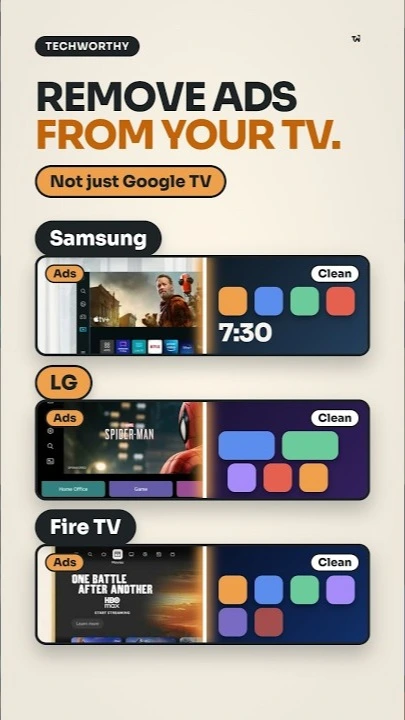
- Samsung: AeroTizen needs Developer Mode and a Samsung account
- LG: turn off home promotion first; cleanyourtv-WebOS needs a rooted TV, which can void your warranty
- Fire TV: Fire OS works, Vega OS doesn’t; dumbtv’s changes can be undone
- These are unaudited community projects: use them at your own risk
Contents
Ads on your Samsung, LG or Fire TV home screen? Unlike Google TV, these take a bit more setup, but they are doable. Three open-source community projects are worth a look.
Which project for which TV
| TV | Project | What you need | Main risk |
|---|---|---|---|
| Samsung | AeroTizen | Developer Mode and a Samsung account | May affect warranty or break after an update |
| LG | cleanyourtv-WebOS | A rooted TV (try an older set) | Rooting can void your warranty |
| Fire TV | dumbtv | Fire OS (Vega OS does not work) | Changes can be undone; updates may undo them |
Samsung: AeroTizen
AeroTizen is a clean home screen for Samsung TVs. It needs Developer Mode and a Samsung account. Project: github.com/helalaou/AeroTizen.
LG: cleanyourtv-WebOS
Turn off home promotion in the settings first. The deeper clean, cleanyourtv-WebOS, needs a rooted TV, which can void your warranty, so try an older set. Project: github.com/PhompAng/cleanyourtv-WebOS.
Fire TV: dumbtv
Open Settings, then My Fire TV, then About. Fire OS works; Vega OS does not. The dumbtv project trims ads and tracking, and its changes can be undone. Project: github.com/humblemuzzu/dumbtv.
What you need, and the risks
You will need Claude Code or Codex running on a computer on the same network as your TV.
- Back up first, and disable apps instead of uninstalling them.
- Keep a way to revert, and never touch core apps such as the Play Store or the keyboard.
- Expect a big system update to switch some apps back on.
- Results vary by TV.
These are community projects. We have not audited the code, and we are not affiliated with Samsung, LG, Amazon or the project authors. Use them at your own risk, since they may affect your warranty or break after a TV update.
Graphics and illustrations: Techworthy. Techworthy is not affiliated with the services or projects mentioned.
Did this answer your question?
Up next: Amazon Echo TimeMore gadgets like this
Other gadgets we have explained, picked by maker and topic.
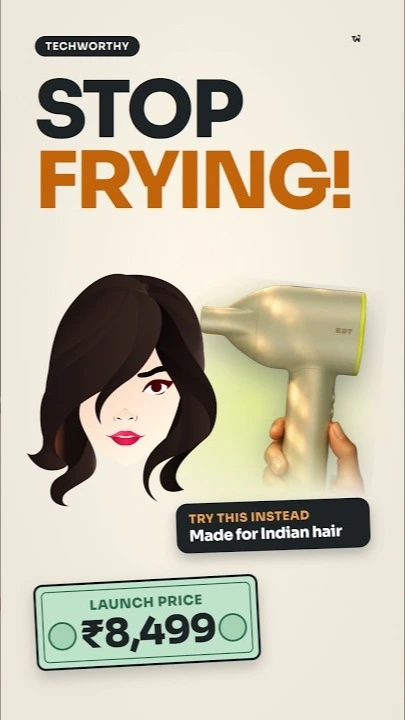 Smart HomeSUKI Hair Dryer by EDTA hair dryer that says it checks air temperature 100 times a second.₹8,499More in Smart Home
Keep reading
Questions people ask
Can you remove ads from a Samsung TV home screen?
Samsung owners can try AeroTizen, a community project that gives a clean home screen. It needs Developer Mode and a Samsung account.
Can you remove ads from an LG TV home screen?
Turn off home promotion in the settings first. The deeper clean, cleanyourtv-WebOS, needs a rooted TV, which can void your warranty.
Can you remove ads from a Fire TV home screen?
The dumbtv project trims ads and tracking on Fire OS, and its changes can be undone. Vega OS does not work.
Is it safe to remove ads from a smart TV with these projects?
They are community projects that we have not audited. They may affect your warranty or break after a TV update, so back up first and use them at your own risk.
What do I need to remove ads from my TV with these projects?
You will need Claude Code or Codex running on a computer on the same network as your TV.
Will TV ads come back after an update?
A big system update can switch some apps back on, and these projects may break after a TV update.
Sources
- AeroTizen (GitHub (helalaou), Other)
- cleanyourtv-WebOS (GitHub (PhompAng), Other)
- dumbtv (GitHub (humblemuzzu), Other)