FlowOS: The 128 MB OS for Windows, Android, Mac and Linux Apps
Researched, not hands-on tested
Key takeaways
- Runs Windows, Android, Mac and Linux apps on one Linux-based desktop.
- Velotic says it needs about 128 MB of RAM at idle; Windows 11 needs 4 GB.
- 98 apps are marked working so far: 42 Windows, 11 Android, 2 Mac and 43 Linux.
- No TPM, SSE4.2 or POPCNT needed; Secure Boot must be off to install.
- Early access opens December 2026: $20 until 30 November, then $25, one time.
- Anti-cheat games are planned for a January update, Adobe apps for December.
- No public ISO or independent test yet; every figure comes from Velotic.
Contents
- FlowOS at a glance
- What is FlowOS?
- FlowOS system requirements compared with Windows 11 and Ubuntu
- How does FlowOS run Windows, Android, Mac and Linux apps?
- Which apps work on FlowOS?
- Can FlowOS play games?
- Is the 128 MB claim real?
- FlowOS release date and roadmap
- FlowOS price and refund policy
- How to install FlowOS next to Windows
- Is FlowOS a Windows 10 or Windows 11 alternative?
- FlowOS privacy, licence and who makes it
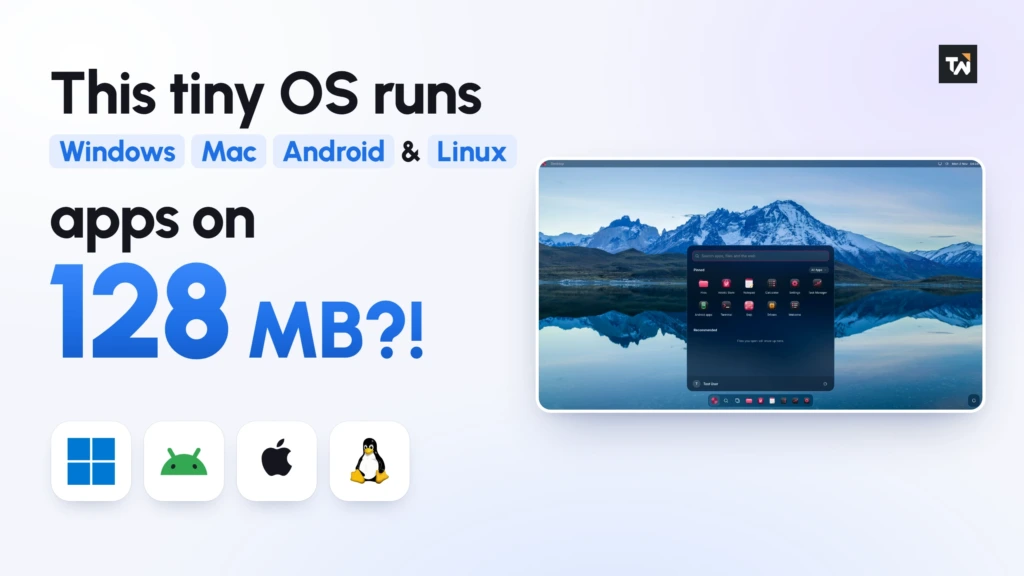
FlowOS is a new desktop operating system from Velotic Studios that runs Windows, Android, Mac and Linux apps on one desktop. Velotic says it needs only 128 MB of RAM, while Windows 11 asks for 4 GB.
Last checked 14 Nov 2026. Early access opens in December 2026, and Velotic updates its app list often.
FlowOS at a glance
| Detail | FlowOS |
|---|---|
| Developer | Velotic Studios LLC (Wyoming, United States) |
| What it is | Closed-source, Linux-based desktop OS built on Arch Linux with a custom KDE-based desktop |
| Runs | Windows (.exe, .msi), Android (.apk, Play Store), Mac (.app, .dmg, experimental) and Linux (.deb, .rpm, Arch) apps |
| RAM | From about 128 MB at idle, per Velotic |
| Disk space | At least 20 GB, shown in the installer |
| CPU | Any 64-bit (x64) PC at launch; 32-bit and ARM builds come “a few months after launch” |
| Not required | TPM 2.0, SSE4.2, POPCNT (Secure Boot must be off to install) |
| Install | Next to Windows or on the whole drive, from a USB stick or from inside Windows |
| Price | $20 early access until 30 Nov 2026, then $25. One-time, one PC |
| Release | Early access opens December 2026 |
| Official site | flowos.veloticstudios.com |
What is FlowOS?
FlowOS is a desktop operating system for PCs. Velotic’s FAQ says it is built on Arch Linux with its own desktop based on KDE.
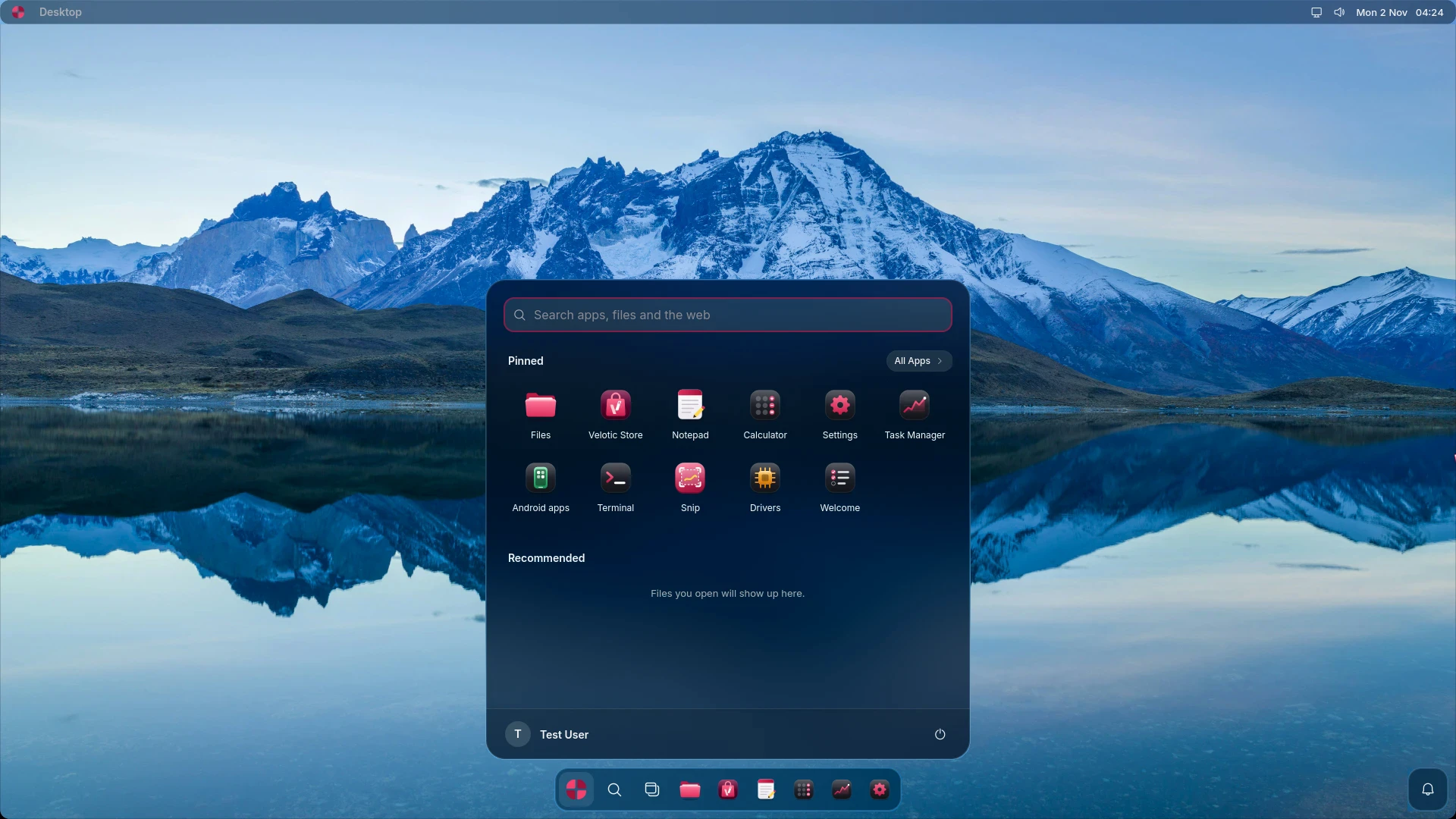
Arch Linux calls itself a lightweight and flexible distribution. KDE Plasma is an open-source desktop with themes, widgets and panels you can customise.
On top of that base, Velotic adds compatibility layers for Windows, Android and Mac apps. A single Velotic Store installs apps from any of the four worlds, and Spotify is Velotic’s one-click example.

FlowOS can also pull apps from third-party sources such as Flathub, according to its Terms. Velotic pitches it at PCs that still work but fall outside Windows 11’s requirements.
FlowOS system requirements compared with Windows 11 and Ubuntu
| Requirement | Windows 11 | Ubuntu 26.04 LTS | FlowOS (Velotic says) |
|---|---|---|---|
| RAM | 4 GB | 6 GB | About 128 MB at idle |
| Storage | 64 GB | 25 GB | At least 20 GB (shown in the installer) |
| CPU | 1 GHz, 2+ cores, 64-bit | 2 GHz dual-core | Any 64-bit (x64) PC |
| TPM 2.0 | Required | Not listed | Not required |
| Secure Boot | Capable firmware required | Not listed | Not needed to run, must be off to install |
| Graphics | DirectX 12, WDDM 2.0 driver | Not listed | Automatic driver installer, NVIDIA (with CUDA) and AMD included |
- The Windows 11 and Ubuntu figures come from Microsoft’s specification page and Ubuntu’s desktop download page.
- FlowOS’s 128 MB is an idle figure from Velotic’s FAQ. Windows 11’s 4 GB is an install minimum, so the comparison is not like for like.
- Velotic’s “32 times less memory” is simply 4,096 MB divided by 128 MB.
- The installer screen says FlowOS needs at least 20 GB of disk space. Velotic has not published recommended specs.
How does FlowOS run Windows, Android, Mac and Linux apps?
| App type | File types | How, per Velotic | Status |
|---|---|---|---|
| Windows | .exe, .msi | Windows layer built on Wine and Proton (Terms) | 42 work, 8 testing |
| Android | .apk, Play Store | Runs directly, no emulator like BlueStacks. Velotic does not name the component | 11 work, 1 testing |
| Mac | .app, .dmg | Darling (Terms). Newer than the Windows layer | Experimental. 2 work, 2 testing |
| Linux | .deb, .rpm, Arch packages | Runs natively | 43 work, 1 testing |
What Wine, Proton and Darling are
- Wine is the open-source layer that lets Windows programs run on Linux.
- Proton is Valve’s Wine-based tool for running Windows-only Steam games on Linux.
- Darling calls itself a translation layer that runs macOS software on Linux without a hardware emulator. Its own site describes graphical app support as basic and experimental.
- Android on Linux usually means a container. Waydroid, for example, boots a full Android system in a Linux container. Velotic does not say whether FlowOS uses it.
Velotic’s Terms promise no specific app, game or device. Compatibility “differs from app to app”.
Independent write-up Webiano points out that API support and CPU instruction support are separate. Android apps with native code may need SSE4.2 or POPCNT, which FlowOS says it does not require.
Which apps work on FlowOS?
| App type | Marked Works | Testing | Examples |
|---|---|---|---|
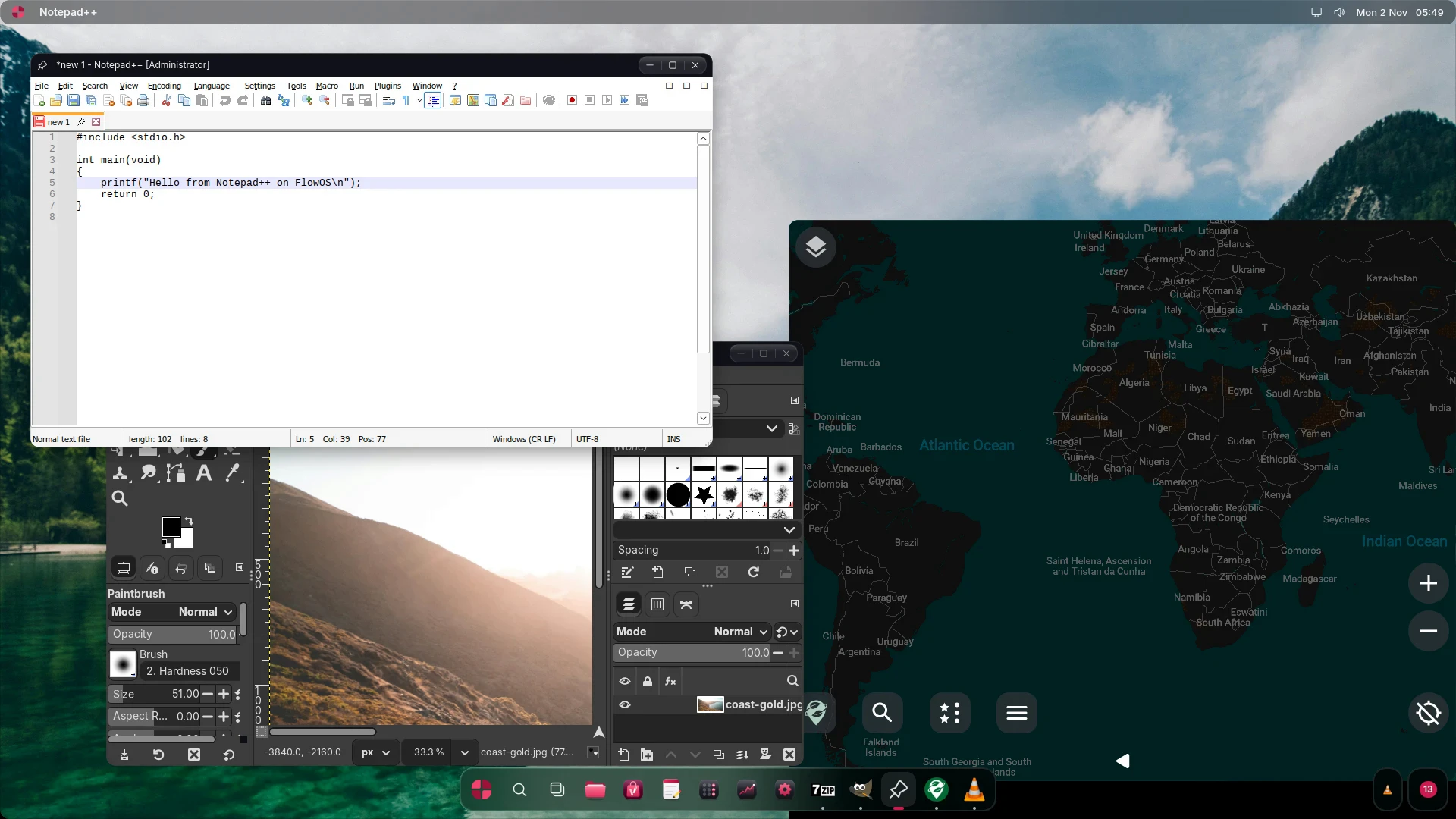
| Windows | 42 | 8 | Microsoft Office, Word, Excel, PowerPoint, Outlook, Teams, Steam, Epic Games Launcher, FL Studio, Discord, Spotify, VLC, Firefox, OBS Studio, GIMP, VS Code, Zoom, MetaTrader 4 and 5 |
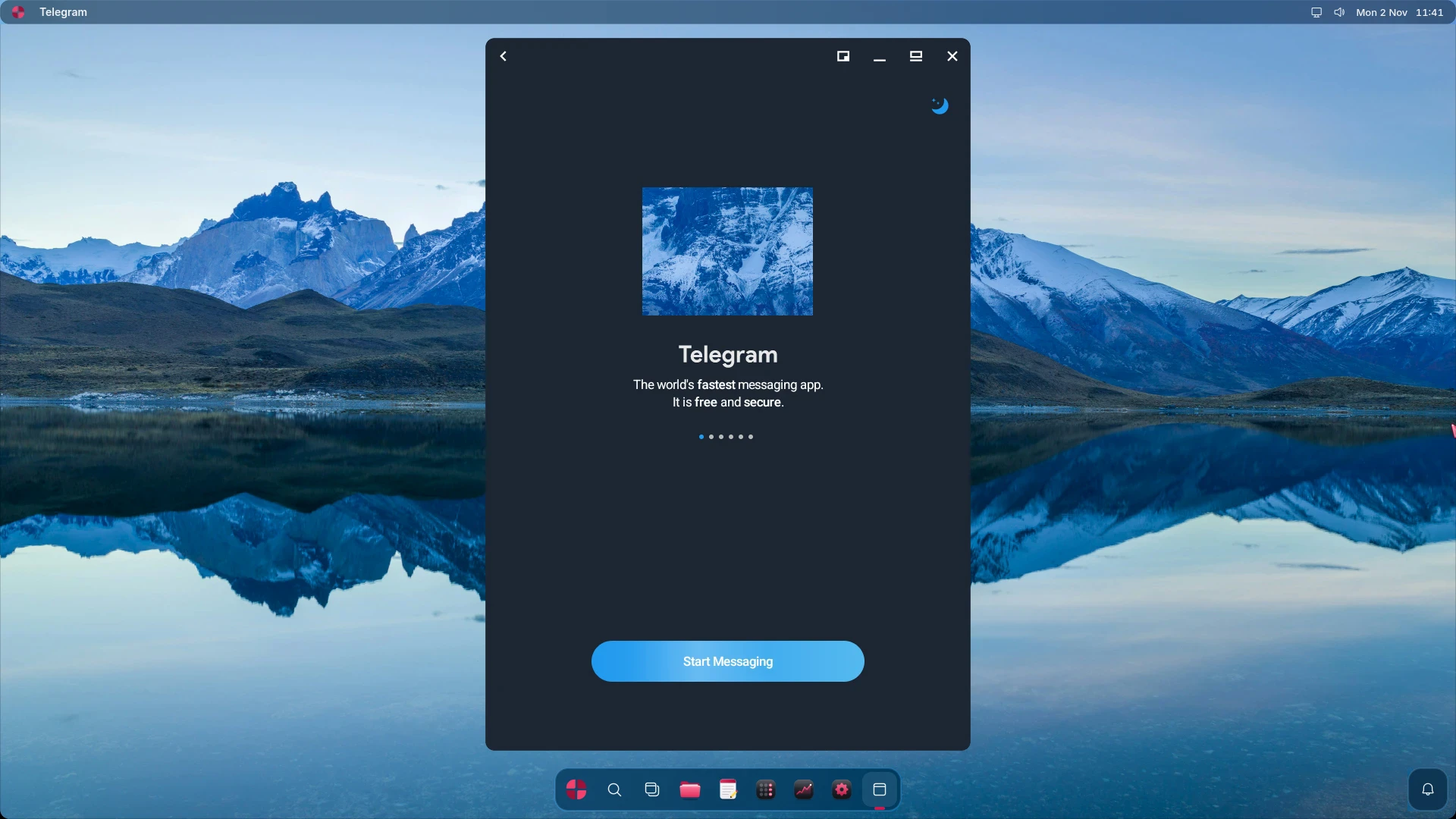
| Android | 11 | 1 | YouTube, Gmail, Telegram, Canva, VLC, NewPipe, Organic Maps, Termux |
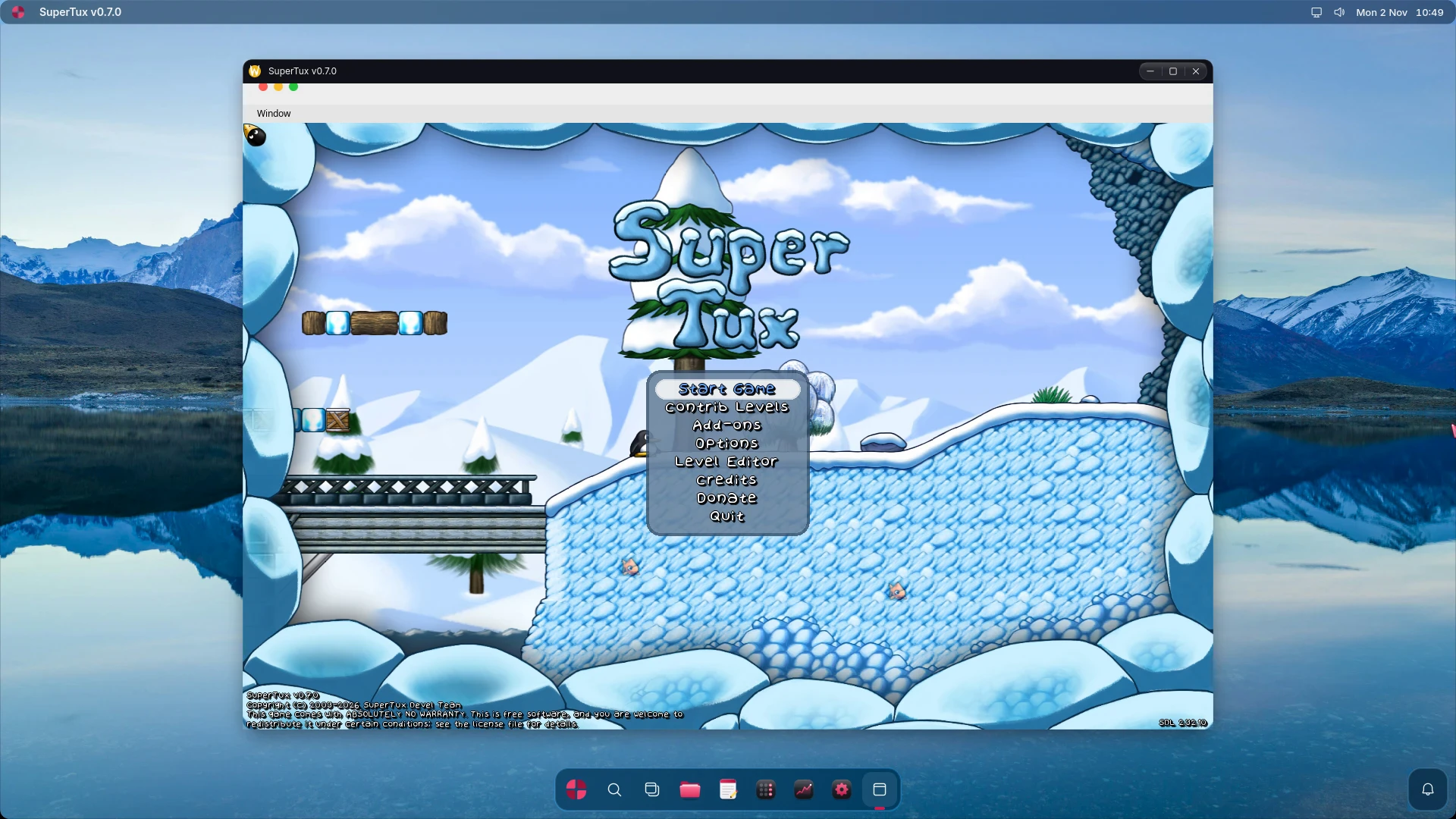
| Mac | 2 | 2 | SuperTux, Platypus (testing: VLC, Google Chrome) |
| Linux | 43 | 1 | Chrome, Brave, Discord, VS Code, Cursor, Docker, Obsidian, 1Password, Claude Desktop, LM Studio, FreeCAD, Kodi |
| Total | 98 | 12 | Velotic says Works means the app opened and ran on its own test machines |
Still being tested
- Windows: TeamViewer, GTA V (story mode), Cyberpunk 2077, Forza Horizon, DaVinci Resolve, Affinity, Bitwig Studio, NinjaTrader 8.
- Android: WhatsApp.
Not working yet
- Chrome for Windows does not load pages yet. Chrome for Linux works.
- Games with kernel anti-cheat, such as Valorant, GTA Online and Fortnite.
- Mac apps beyond a small experimental set.
Velotic’s list marks Office and Photoshop as working in its tests. Its FAQ also says Office and Adobe apps run in Windows Engine 1.0, which arrives in the December release. Check which build you need before relying on them.
Missing an app? Velotic takes requests through its early-access form and Discord.
Can FlowOS play games?
Velotic says most Steam games run and that Steam and Epic work. Steam uses the Linux client with Proton for Windows games. GTA V (story mode), Cyberpunk 2077 and Forza Horizon are still in testing.
Kernel anti-cheat is the hard part. Velotic says Valorant, Fortnite and Call of Duty will run in Windows Engine 2.0, which it describes as its built-in TinyOS layer, in the January update.
For context, here is where anti-cheat games stand across Linux in general, from Are We Anti-Cheat Yet on 14 Nov 2026:
| Status | Games | Share |
|---|---|---|
| Supported | 196 | 17% |
| Running | 280 | 24% |
| Broken | 636 | 54% |
| Denied | 53 | 5% |
| Listed in total | 1,167 |
These numbers are for Linux, not FlowOS. They show why anti-cheat titles are the hardest category for any compatibility layer.
Is the 128 MB claim real?
What Velotic showed
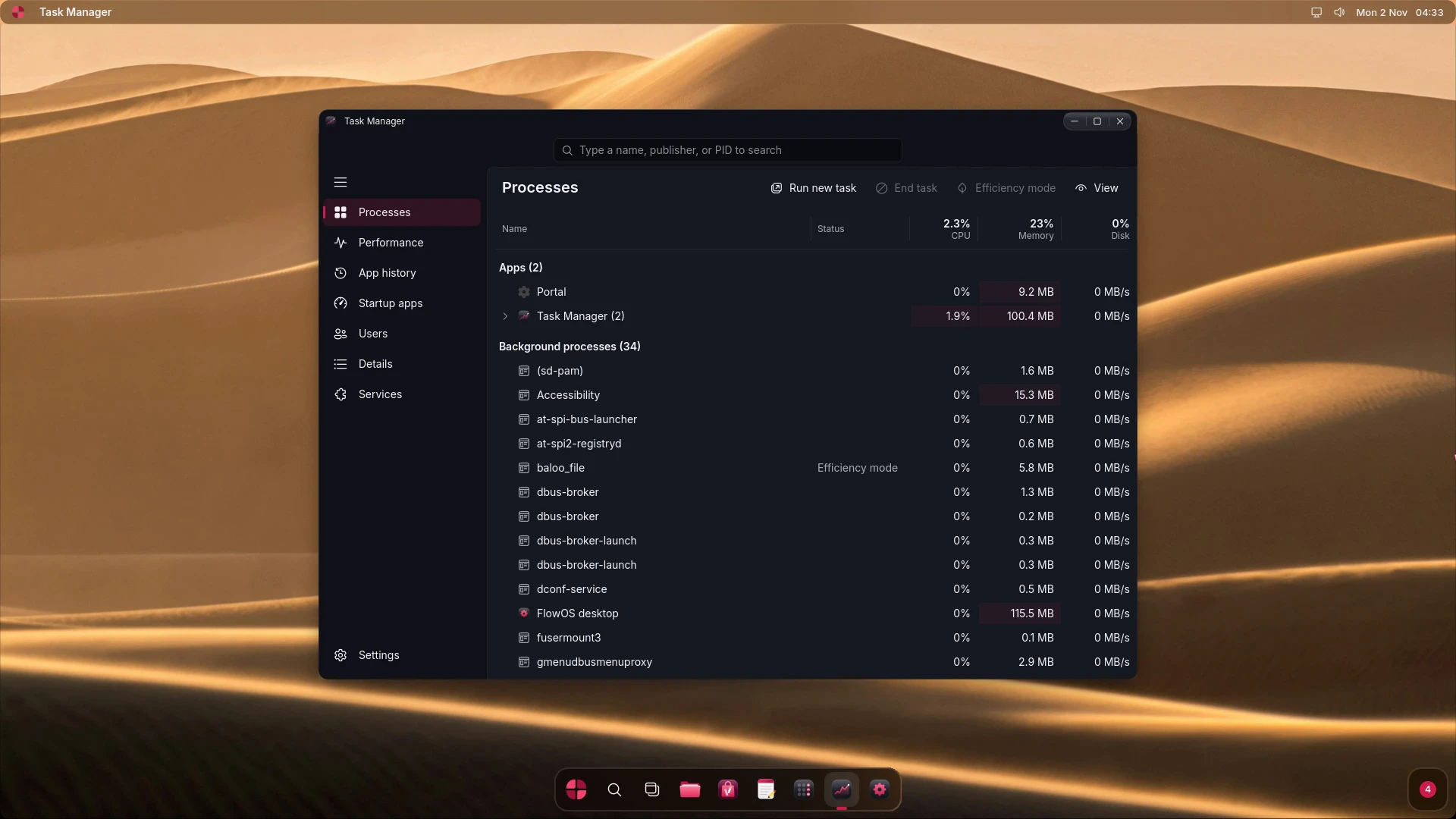
- A Task Manager clip with 93 of 98 MB in use on a PC configured with 128 MB of RAM.
- The footage was recorded in a virtual machine and played at 2x speed.
- Velotic’s FAQ says FlowOS runs from about 128 MB at idle. Its Terms say memory figures are typical results from its own tests and vary.
What is still unanswered
- Webiano notes the gap between the 128 MB configured and the 98 MB shown is unexplained, and that Velotic does not say whether swap was used.
- Velotic says there are no benchmarks yet, only an expectation that FlowOS will perform better than Windows.
- Supported CPUs, firmware and peripherals such as Wi-Fi and Bluetooth have not been listed.
- As of 6 Nov 2026 Webiano found no public ISO and no independent hands-on test. Every figure on this page comes from Velotic.
FlowOS release date and roadmap
| When | What |
|---|---|
| 5 Nov 2026 | FlowOS announced (date reported by Webiano) |
| 6 to 7 Nov 2026 | Velotic’s privacy, refund and terms pages take effect |
| 30 Nov 2026 | Last day for the $20 early-access price. Terms say book before 1 Dec |
| December 2026 | Early access opens and buyers get the ISO and licence by email. Windows Engine 1.0 brings Office and Adobe apps |
| January 2027 | Windows Engine 2.0 in “the January update”, with anti-cheat games |
| A few months after launch | 32-bit and ARM builds, which also covers Apple Silicon Macs and ARM tablets |
If the date moves, Velotic emails buyers, who can keep the booking at the price paid or cancel. FlowOS checks for updates daily and never forces them.
FlowOS price and refund policy
| Item | Detail |
|---|---|
| Early-access price | $20 if booked before 1 Dec 2026 |
| Price after that | $25 |
| Billing | One time. No subscription |
| Licence | One PC. Personal and non-transferable. Activation limits are shown at purchase |
| What you get | The FlowOS ISO and your licence by email when early access opens |
| Payment | Stripe-hosted checkout. Outside the US a local currency may be shown with a conversion fee |
| Refund before release | Full refund, any time, for any reason |
| Refund after release | Full refund within 14 days if you have not downloaded the ISO. No refund once downloaded |
| Refund speed | 5 to 10 business days |
| Buyer age | 18 or older |
Velotic says that if it cancels FlowOS, every booking is refunded in full.
How to install FlowOS next to Windows
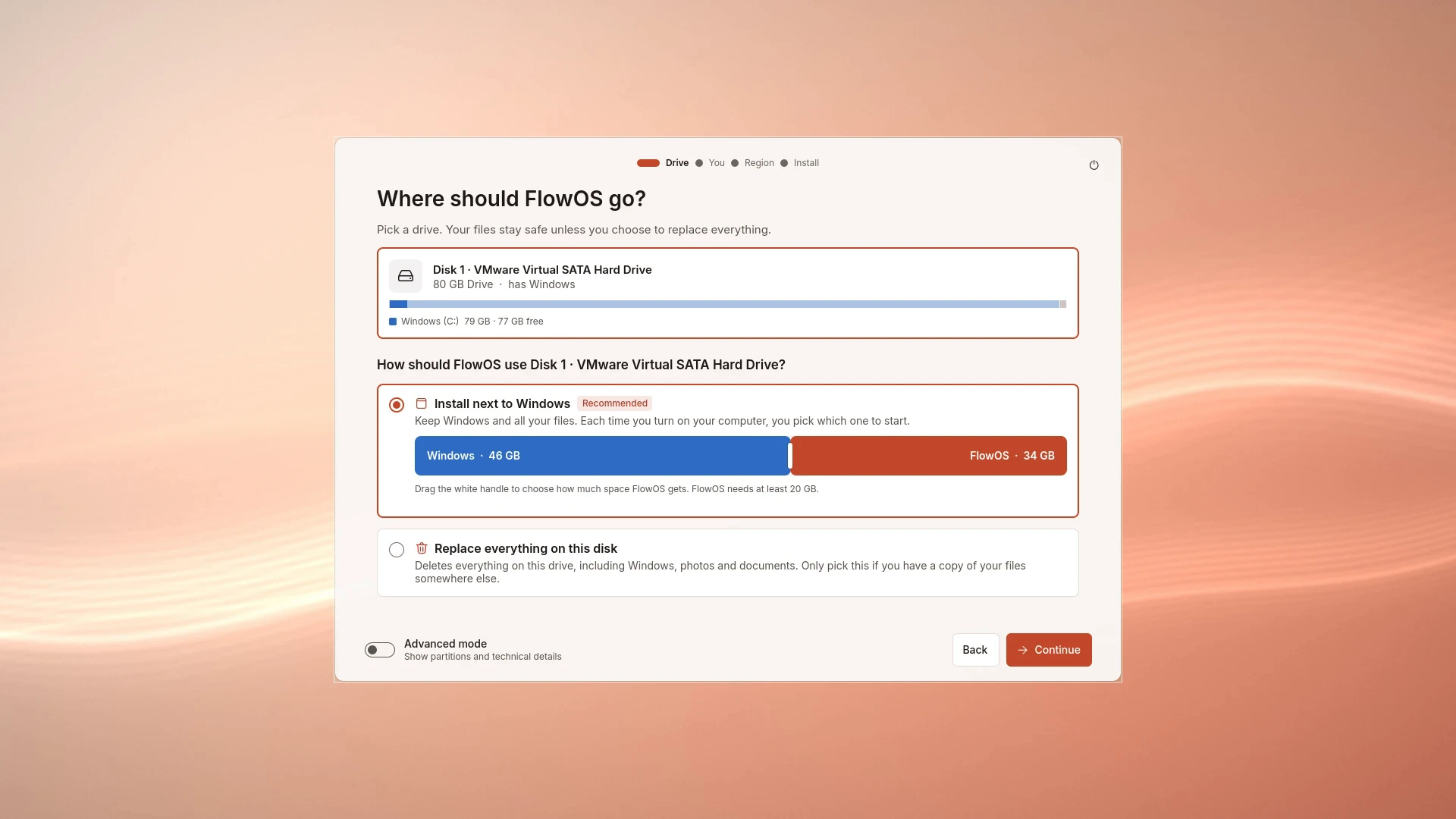
- Start the FlowOS installer, from a USB stick or from inside Windows.
- Choose “Install next to Windows”.
- Let FlowOS copy itself to the drive.
- Restart and pick Windows or FlowOS from the boot menu each time the PC starts.
Before you install
- Back up your data. Velotic’s Terms warn that installing an OS can erase data on a drive.
- Turn Secure Boot off. Velotic says it must be off to install, as with most Linux systems.
- Windows keeps all its files when you install next to it.
- Velotic’s public pages do not say how the installer treats BitLocker-protected drives.
- An automatic driver installer checks your hardware and adds drivers, including NVIDIA with CUDA and AMD.
Is FlowOS a Windows 10 or Windows 11 alternative?
Windows 10 support ended on 14 Oct 2025. Microsoft’s consumer Extended Security Updates run through 12 Oct 2027 and cost nothing with PC Settings sync, 1,000 Microsoft Rewards points or a one-time $30 purchase.
FlowOS is aimed at the PCs that fall between those options: still working, but blocked by Windows 11’s TPM, RAM or CPU checks.
It may fit if
- Your PC is 64-bit and Windows 11 rejects it.
- Your daily apps are on the Works list.
- You are fine with dual boot and a Secure Boot change.
Check first if
- You need 32-bit or ARM support, which comes months after launch.
- You play kernel anti-cheat games before the January update.
- You depend on Chrome for Windows, which does not load pages yet.
- Your app is not on the list. Ask on Velotic’s Discord.
FlowOS privacy, licence and who makes it
- Telemetry: Velotic says FlowOS has no telemetry, analytics, crash reporting or advertising. It contacts Velotic’s update server only to check for updates.
- Source: FlowOS is closed source. Open-source components such as Wine, Proton and Darling keep their own licences, and source is available on request.
- Company: Velotic Studios LLC, Wyoming. Support: support@veloticstudios.com.
- How it was built: Velotic says it was AI assisted, built and tested by its team, and not vibe coded.
- Name clash: Other projects share the FlowOS name. This one lives at flowos.veloticstudios.com.
Screens and demo clip: Velotic Studios (FlowOS). Other graphics: Techworthy. Windows, macOS, Android and Steam are trademarks of their owners. FlowOS is not affiliated with or endorsed by Microsoft, Apple, Google or Valve.
Did this answer your question?
Up next: OrigamiSwift Mouse: Price, Folded Size, Specs and FAQMore gadgets like this
Other gadgets we have explained, picked by maker and topic.
 ProductivityHP EliteBoard G2aA full Windows 11 PC built into a slim keyboard$3,028More in Productivity
 ProductivityArctic Fox Super MouseA wired mouse with a 3.1-inch touchscreen for app shortcuts.$199More in Productivity


Keep reading
Questions people ask
What is FlowOS?
FlowOS is a new desktop operating system from Velotic Studios that runs Windows, Android, Mac and Linux apps on one desktop. It is built on Arch Linux with a custom KDE-based desktop.
Who makes FlowOS?
FlowOS is made by Velotic Studios LLC, a Wyoming company. Velotic says it was AI assisted, built and tested by its team.
How much RAM does FlowOS need?
Velotic says FlowOS runs from about 128 MB of RAM at idle. Windows 11 needs 4 GB. Velotic's demo shows 93 of 98 MB in use in a virtual machine, and its Terms say memory figures vary.
Is FlowOS based on Linux?
Yes. Velotic's Terms call FlowOS a Linux-based desktop operating system, and its FAQ says it is built on Arch Linux with a custom KDE-based desktop.
Can FlowOS run Windows apps and .exe files?
Yes, per Velotic. The Windows layer handles .exe and .msi files and is built on Wine and Proton. Velotic marks 42 Windows apps as working, including Microsoft Office, Steam and FL Studio, with 8 more in testing.
Can FlowOS run Android apps without an emulator?
Velotic says Android apps run directly, with no emulator like BlueStacks. It supports .apk files and the Play Store, and marks 11 Android apps as working, including YouTube and Gmail.
Can FlowOS run Mac apps?
Only in a limited way. Mac support uses Darling and is labelled experimental. Two Mac apps, SuperTux and Platypus, are marked as working.
Does FlowOS need TPM or Secure Boot?
FlowOS does not need TPM 2.0, SSE4.2 or POPCNT. It also does not need Secure Boot to run, but Velotic says Secure Boot must be turned off to install it.
Can I install FlowOS next to Windows?
Yes. FlowOS can install next to Windows, from a USB stick or from inside Windows, and you pick Windows or FlowOS each time the PC starts. Back up your data first, because installing an OS can erase it.
Can FlowOS play Valorant or Fortnite?
Not yet. Games with kernel anti-cheat do not run today. Velotic says Valorant, Fortnite and Call of Duty will run in Windows Engine 2.0, planned for the January update.
Does Microsoft Office or Photoshop work on FlowOS?
Velotic's app list marks Microsoft Office apps and Photoshop as working in its tests. Its FAQ also says Office and Adobe apps run in Windows Engine 1.0, which arrives in the December release.
How much does FlowOS cost and when is the release date?
Early access costs $20 if booked before 1 December 2026, then $25. It is a one-time price for one PC. Early access opens in December 2026, with a full refund any time before release.
Is FlowOS open source and does it collect data?
FlowOS is closed source, though its open-source components keep their own licences. Velotic says it has no telemetry, analytics, crash reporting or advertising, and contacts its server only for updates.
Will FlowOS run on 32-bit, ARM or very old PCs?
At launch it targets 64-bit (x64) PCs. Velotic says 32-bit and ARM versions arrive a few months later. Intel and AMD Chromebooks can work once unlocked with UEFI firmware.
Is FlowOS a Windows 11 killer?
That is the nickname some people use because of its 128 MB figure. FlowOS is not yet publicly available and its figures are unverified by outside testers, so it is best seen as an early alternative for PCs that Windows 11 rejects.
Is this FlowOS the same as other FlowOS or Flo OS projects?
No. Several unrelated projects use similar names. The one covered here is by Velotic Studios and lives at flowos.veloticstudios.com.
Sources
- FlowOS official site and FAQ (Velotic Studios, Manufacturer, accessed 14 Nov 2026)
- FlowOS Terms of Service (Velotic Studios, Manufacturer, accessed 14 Nov 2026)
- FlowOS Refund Policy (Velotic Studios, Manufacturer, accessed 14 Nov 2026)
- FlowOS runs on any PC with as little as 128 MB of RAM (analysis) (Webiano Digital, Report, accessed 14 Nov 2026)
- Windows 11 system requirements (Microsoft, Manufacturer, accessed 14 Nov 2026)
- Extended Security Updates for Windows 10 (Microsoft, Manufacturer, accessed 14 Nov 2026)
- Ubuntu Desktop download and requirements (Canonical, Manufacturer, accessed 14 Nov 2026)
- Are We Anti-Cheat Yet? (Community project, Report, accessed 14 Nov 2026)